This blog was originally written for Team Copilot and is republished here on my personal website.
My name is Dani Brandsema. I am 28 years old, based in the Netherlands, and I work as an Adoption Consultant at Wortell. My focus is on AI, Microsoft Copilot and Agents, but what really drives me is not the technology itself. It is the people behind it. I am also the Product Owner of our Copilot Adoption service, where I help shape how we guide organizations in making Copilot part of their everyday work, not as a shiny new tool, but as a habit.
What excites me about Copilot adoption is seeing the moment when someone goes from hesitation to curiosity, and from curiosity to confidence. That is where the real impact happens. Outside of work, you will often find me in the gym or on horseback. I ride twice a week and compete as part of a quadrille team, and in many ways both hobbies feel similar to adoption. Progress takes time, repetition matters, and trust is built step by step.
With this blog series, I want to share my enthusiasm and experience more broadly. Every month, I will write about Copilot and adoption, newly released features, and my perspective on what they really mean in practice. Not just what is possible, but how it actually fits into real workdays. I love sharing knowledge and helping others become more productive, but above all, I hope these blogs inspire you to experiment, to try things out, and to slowly turn Copilot from something new into something natural.
That focus on habits and everyday work is exactly where Copilot starts to become interesting for me. Not in the big promises or future scenarios, but in the small moments where it quietly supports the way we already work. One of those moments is meetings. Planning them, preparing for them, and making sure something actually happens afterwards. That is where I currently see a lot of new Copilot features coming together, and where the impact on daily work can be felt almost immediately.
This month, I want to zoom in on how Copilot supports the full meeting lifecycle. Meetings are a big part of our workdays. Yet they are also one of the areas where a lot of time, energy and focus get lost. We prepare last minute, we join without full context, and afterwards we promise ourselves to write a recap or follow up on actions later. Often, later never happens.
With recent updates to Copilot in Outlook and Microsoft Teams, Microsoft is clearly focusing on supporting the full meeting lifecycle. Not just during the meeting, but also before and after. In this blog, I want to walk you through two features that really stand out to me and that I see a lot of potential in when it comes to everyday use.
Custom meeting summaries in Microsoft Teams
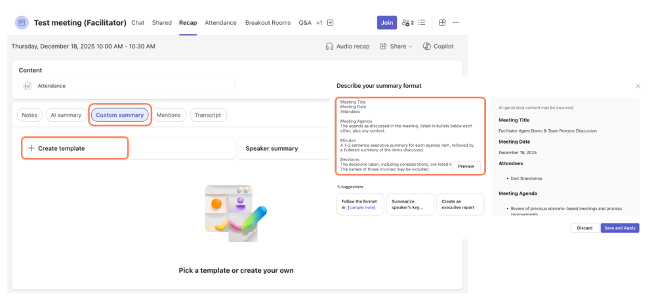
Copilot in Teams has taken a big step forward with custom meeting summaries. Instead of relying on one standard recap, you can now guide Copilot in how you want your meeting summary to look and what it should focus on.
You can create your own summary template and tell Copilot exactly how the recap should be structured. For example, does your organization always start meeting notes with the meeting title, date and attendees? Then simply include that in your template. From there, you can define the rest of the structure. You might prefer bullet-point notes, a table with topics per speaker, or a clear separation between decisions and action items.
If your organization already works with a standard meeting template, you can even copy and paste that existing format into Copilot. From that moment on, you can easily create a meeting recap within the right structure with one click of a button. It is a small setup step that can save a lot of time after every meeting.
I really like how practical this is. You are not just getting a summary; you are getting a summary that actually fits the way you work.
What I would love to see as a next step is the ability to automatically export these summaries, for example to a document or a shared workspace, and to add branding elements such as your corporate style. That feels like a logical next phase, but for now this already adds a lot of value.
Creating an agenda when scheduling a meeting in Outlook
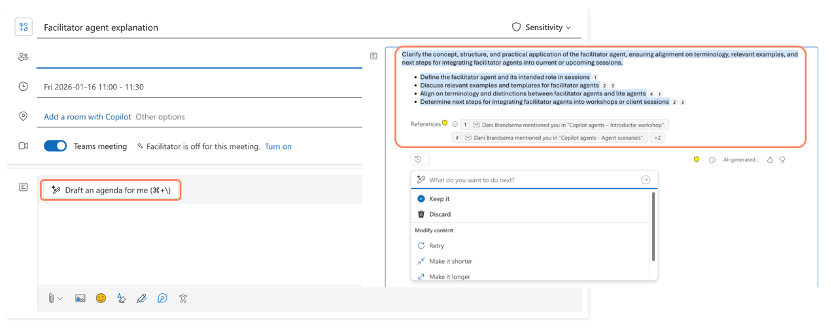
Another feature that deserves attention lives in Outlook, right at the moment when you schedule a meeting. Copilot can now help you create a meeting agenda based on the context it has available. This includes the meeting title, participants and relevant email and chat conversations.
I would honestly recommend everyone to try this feature, even if you think an agenda is not strictly necessary for your meeting. Adding an agenda to the invitation does more than just inform participants. It also gives Copilot important context. During the meeting, Copilot can better understand what the meeting is about and what matters, because the agenda acts as a guiding framework.
The feature works well, but there is definitely room for further development. Ideally, I would like to give Copilot more guidance, such as what should always be included on an agenda or what topics are out of scope. At the moment, Copilot can sometimes pull in context that turns out to be irrelevant, which means you need to iterate a bit to get the agenda right.
Still, I see this as a very strong starting point. It lowers the barrier to creating structured meetings and sparks ideas, even if you end up adjusting the agenda yourself.
Preparing for a meeting with Copilot in Outlook
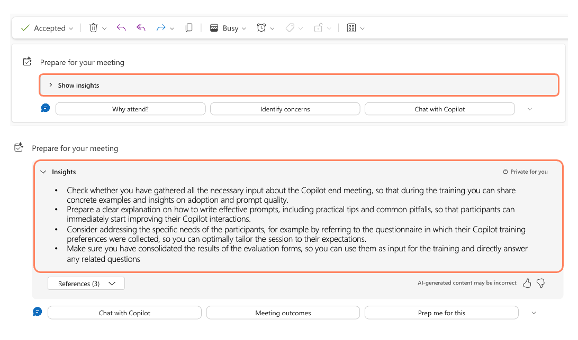
The third feature ties everything together: meeting preparation in Outlook. Before a meeting starts, Copilot can help you prepare by summarizing everything that is relevant to that specific meeting.
What I like most about this feature is that it gives you clear, actionable insights. Copilot shows you what has been discussed before, what documents are relevant, and which actions might require your attention. It also includes references, so you can easily click through to emails, files or previous meetings if you want more detail.
On top of that, you can ask follow-up questions and seamlessly continue in Copilot Chat. That makes it easy to dive deeper without losing context.
This is especially useful if you spend a lot of time in meetings and sometimes lose track of what exactly you need to prepare for each one. Instead of manually searching through emails and files, you get one clear overview that helps you focus on what really matters.
Closing thoughts
What stands out to me across these features is how they support better habits around meetings. Not by forcing change, but by making the right thing easier to do. A clearer agenda, better preparation, and more structured follow-up all start to feel more natural when Copilot supports you at the right moments.
These features are not perfect yet, and they will continue to evolve. But they already show how Copilot is moving beyond isolated productivity boosts and towards supporting real workflows. From preparation to follow-up, meetings are becoming a little more intentional, and that is a change I am very curious to see develop further.



 Dani Brandsema