This blog was originally written for Team Copilot and is republished here on my personal website.
Over the past year, we have seen Microsoft 365 Copilot gradually move closer to the core of how we work. Not through one big breakthrough, but through a series of small steps that make the technology feel more integrated into our daily tools.
First, Copilot helped us summarize meetings and emails. Then it started supporting the way we create documents and presentations. With the announcement of Copilot Wave 3, Microsoft seems to be taking the next step in that journey. The focus is shifting from Copilot as an assistant that responds to prompts, toward something that behaves more like a coworker. Something that can take on work, keep track of progress and operate across multiple tools and pieces of context.
In this blog, I want to walk through some of the key elements of Wave 3 and share my own observations and questions along the way.
Copilot Cowork: delegating work instead of prompting
One of the most interesting announcements in Wave 3 is Copilot Cowork. Until now, most Copilot interactions have followed a familiar pattern: you write a prompt, Copilot generates an answer, and then you refine from there. It works well for many tasks, but it is still quite transactional.
Copilot Cowork aims to change that.Instead of responding to a single prompt, Copilot can now take on multi-step work that evolves over time. You define a goal, and Copilot starts planning the steps required to reach it. It can analyze files, create drafts, refine results and keep track of progress while you monitor and guide the process. Think about scenarios like:
- preparing a competitive analysis
- creating a project presentation
- organizing meeting follow-ups and documentation
- analyzing datasets across multiple files
In these scenarios, Copilot is not just answering questions. It is actively working through the task. Technically, this capability is powered by Anthropic’s Claude models, which Microsoft is integrating alongside its existing OpenAI models.
This immediately raises an interesting question for organizations in Europe. Anthropic models are currently disabled by default in EU, UK and EFTA tenants, mainly due to regulatory and compliance considerations, including data residency requirements and the evolving EU AI Act. Until Microsoft can guarantee that these models fully meet regional governance, privacy and data-processing standards, administrators must explicitly enable them before they can be used. That means that while Copilot Cowork looks promising, many organizations in Europe might not be able to use it immediately.
My conclusion for now is that Copilot Cowork mainly shows where Microsoft is heading. The direction is clear: AI that does not just assist, but really participates in work. However, from a practical adoption perspective, it may take some time before this becomes widely available across all environments.
Copilot in Word, Excel, PowerPoint and Outlook
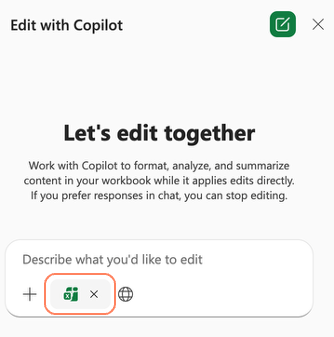
Another part of Wave 3 is the deeper integration of Copilot directly into the Microsoft 365 apps. Earlier announcements referred to this as Agent Mode (as mentioned in my blog from last month), but Microsoft now positions this more as the standard way Copilot works inside the apps!
Instead of generating separate outputs, Copilot increasingly works directly within your existing files. That means:
- working inside existing Word documents instead of creating new drafts
- using real formulas and data logic in Excel
- understanding layouts, styles and objects in PowerPoint
- writing and refining emails directly within Outlook
Working directly inside the document makes the experience feel more natural and reduces friction. If I look at the organizations I work with, this is probably where many employees will feel the first real improvement in their daily work.
Copilot Chat as the starting point for work
Another theme in Wave 3 is the role of Copilot Chat. Microsoft increasingly positions chat as the entry point for work.
Many tasks start with a question, an idea or a request. From Copilot Chat, you can now move directly into action, for example by:
- creating a document or presentation
- generating a spreadsheet
- drafting and sending emails
- scheduling meetings
- continuing work directly in Word, Excel, PowerPoint or Outlook
This reinforces the idea of Copilot as the interface to work, rather than just a feature inside applications. At the same time, it raises an interesting practical question. How well will Copilot understand organizational context, such as templates, corporate style or standard formats? For example:
- Will Copilot automatically use the right Word template?
- Will PowerPoint presentations follow the organization’s slide layouts?
- Will documents align with internal standards for structure and tone?
These things matter more than we sometimes realize. AI can generate content quickly, but real value appears when the output fits naturally into the way an organization already works. I am very curious to see how Copilot will handle these aspects.
Multi-model intelligence
Another important change is that Copilot is becoming multi-model by design. Instead of relying on a single AI provider, Microsoft is combining models from different companies, including OpenAI and Anthropic.
The idea is simple: different models are good at different tasks. Some models are stronger at reasoning, others at generating text or analyzing data. Copilot can automatically select the model that best fits the task. From a user perspective, this is interesting because you do not need to choose a model yourself. Copilot orchestrates that behind the scenes.
But again, the European perspective matters here. Since Anthropic models are currently disabled by default, some organizations may not experience the full multi-model capability immediately.
I am also curious about how this will feel in practice. Will we notice differences in style, tone or reasoning depending on the model Copilot selects? And how will that influence our trust in the system? These are the kinds of things that only become clear once people start working with it day to day.
Microsoft 365 E7
Finally, Microsoft also introduced a new license tier: Microsoft 365 E7. This bundle combines:
- Microsoft 365 Copilot
- advanced security and identity capabilities
- governance tools
- agent management capabilities
The goal is to bring AI, security and governance together in one package for organizations that want to operate at the “frontier” of AI adoption.
The big question here is whether organizations will actually move toward this new tier. For highly regulated industries or large enterprises, this may make sense. Especially when AI governance and compliance become more important. But for many organizations, the existing Microsoft 365 licensing landscape is already complex enough.
It will be interesting to see whether E7 becomes the new standard for AI-driven organizations, or remains a niche option for specific scenarios.
Closing thoughts
What stands out to me most about Copilot Wave 3 is the shift in ambition. Earlier Copilot updates focused on helping you complete tasks faster. Wave 3 starts to explore something different: letting Copilot take responsibility for parts of the work itself.
Copilot Cowork, multi-model intelligence and deeper integration into Microsoft 365 apps all point in the same direction: Copilot is evolving from an assistant that reacts to prompts into a system that can participate in workflows.
At the same time, many of these capabilities are still emerging. Availability depends on tenant settings, compliance choices and regional restrictions, especially when it comes to AI models. That means the coming months will be interesting. Not just because of what Microsoft announces, but because of how organizations actually start using these capabilities in practice.
Because, as with most Copilot features, the real value only becomes clear when it becomes part of everyday work.
If you want to read the full announcement of Copilot Wave 3, you can find it here:

 Dani Brandsema